Gadget Design Standards
Gadgets are omnipresent on the user's desktop, so it's important that they're designed well. After all, you wouldn't want something that's hard to look at
constantly on your desktop, would you?
Gdsk! believes in the creativity of the individual, so the regulations here are pretty relaxed. However, there are still a couple rules you must follow when designing
your gadget.
Please note that while there are guidelines in place, gadget approval is still a subjective process. Gadgets that technically follow all the rules, but are still
obtrusive in some way will still be rejected.
Your gadget must not be obtrusive
This means that your gadget must not interfere with other gadgets, or other elements of the user's machine. A gadget so tall that it takes up the entire sidebar,
or so wide that it covers the user's desktop, is not okay.
There aren't any set limits for how tall or wide a gadget should be, but generally a user should be able to fit at least 4 gadgets on the sidebar, including your own
(on a relatively small screen size, such as 1024x768). For best results, I'd recommend a width of no more than double the height of the gadget.
Your gadget should also try to avoid being distracting. Generally, it's best to avoid bright background colors that will steal the user's attention from what they're
trying to get done.
Your gadget must be accessible
Gdsk! has a wide variety of people in its community. It's best to try and cater to as many of them as possible.
Gadgets featuring rapidly-flashing imagery will usually be rejected, unless there's a very good reason for it to be included. In this case, an epilepsy warning must be
added to the gadget.
If you'd like, you may add additional language support to your gadget. However, all gadgets must at least support English. This is to make the approval process easier,
as well as most of our userbase speaking English.
No AI generated content
Gdsk!'s stance on generative AI is very clear: We do not support it. As such, we do not accept gadgets with AI generated graphical assets. Even gadgets that
were originally accepted will be removed if found to be using generative AI for assets. Don't risk it, just pay an artist.
No explicit content
Gdsk! is not the place for explicit content. Gadgets containing suggestive or explicit content, or gadgets serving inappropriate uses will be rejected.
No Controversial Content
Gdsk! is designed to be safe and enjoyable for everyone. As such, political, racist, sexist, etc. gadgets will be rejected. Religious gadgets are allowed, as long
as they're in good faith towards everyone (For example, a "Bible verse of the day" gadget would be allowed).
Gadget Programming Standards
Just as important as a gadget's design, is the code that makes it work. It's important that your gadget is programmed well to ensure stability and performance.
Your gadget must be performant
Google Desktop is a relic of the past, so many users will be running Gdsk! on machines of the era. We officially support Windows 2000 SP3 and later, same as Google Desktop.
For this reason, your gadget must be optimized to run on machines of this era.
Currently, all gadget submissions are tested on a desktop featuring an AMD Athlon XP 1700+ CPU and 512MB of RAM, running Windows XP SP3.
If your gadget dramatically affects the performance of the machine, it will be rejected.
Your gadget must be stable
Your gadget must be able to handle all the unexpected actions of both the user, and the universe. Interactive gadgets must be able to handle any form of input from the user,
Internet-connected gadgets must be able to gracefully handle a loss of Internet, etc.
Your gadget must be safe
Obviously, your gadget cannot be malicious. Gadgets containing malicious code will be rejected, and will most likely get you blacklisted from submitting more plugins.
Avoid using HTTPS
Older machines generally don't have very good HTTPS support. Most of our users are running Windows XP SP3, which is the minimum that our servers support with HTTPS.
Unfortunately, our servers are set up specifically to support these old versions of HTTPS, and most common web servers will not work by default. For this reason, it's best
to stick with standard HTTP if you aren't transmitting any sensitive information.
Obviously, if you're transmitting sensitive information (such as login info), you should be using HTTPS (and a relatively secure version of it at that). However,
do keep in mind that if you use HTTPS, you will likely be alienating a significant chunk of the userbase.
Plugin Image Guidelines
When submitting your plugin, you'll be asked to provide thumbnail and preview images.
The thumbnail is used to portray your plugin in the Gdsk! Plugin Gallery, as well
as the gadget gallery in Google Desktop.
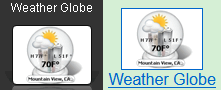
This is your plugin's thumbnail image
The preview image is used on your plugin's details page on the Gdsk! website.
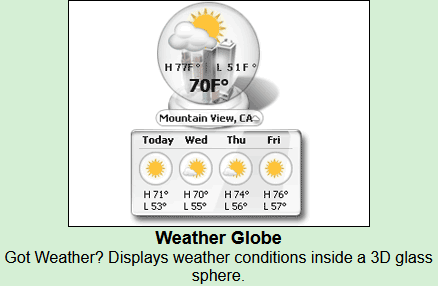
This is your plugin's preview image
Much like the plugin itself, there are some guidelines that these images must follow.
No explicit content
Plugin images must contain no suggestive or explicit content, just like the plugins themselves.
No AI generated content
Again, like the plugins themselves, plugin images cannot be AI generated. AI generated plugin images will get your entire plugin rejected or removed.
Image Specifications
The thumbnail image should have a resolution of 80x31.
The preview image resolution can be flexable, but should be no higher than 460x300.
All images should be submitted in either GIF (non-animated) or PNG format.
|